Google in classroom Administration
As we know Google is extremely beneficial for
Institute administration likewise it is equally beneficial for Classroom
Administration also. Classroom Administration is the way how we manage our
daily operations of classroom like attendance management, test taking, result
evaluation, parents meets etc Google provides many tools for such activities to
accomplish effectively. Some important tools are
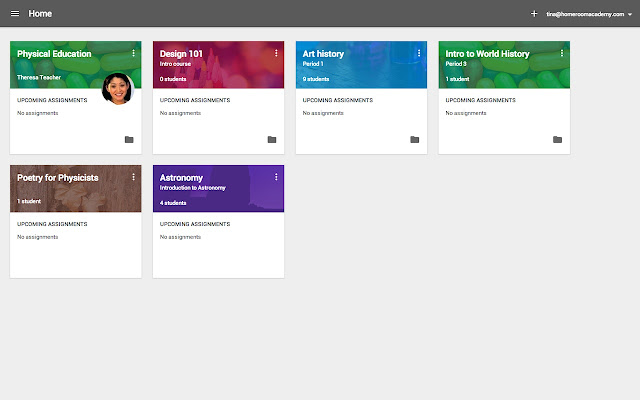
Google classroom: it is a platform where we can perform ( Web / App) all activities
of our classroom that too in virtual environment. it is a platform where
teacher can performs activities like video teaching, Post test, assignments,
make announcement related to daily activities, interact with parents etc..
Teachers can also track performance of an individual student. Student can give
test, receive feedback, scores on each test, can get an announcement regarding
daily activities, can get lecture notes etc. Students can also interact with
each other, track their own performance etc Parents can check progress of their
own ward, important announcements related to daily activities, interact
with the teacher about performance etc. So in short, we can say it provides
common platform for teachers, student and parents.
Classroom is a free service for
schools, non-profits, and anyone with a personal Google account. Classroom
makes it easy for learners and instructors to connect—inside and outside of
schools. Classroom saves time and paper, and makes it easy to create classes,
distribute assignments, communicate, and stay organized.
There are many benefits to
using Classroom:
• Easy to set up – Teachers can
add students directly or share a code with their class to join. It takes just
minutes to set up.
• Saves time – The simple,
paperless assignment workflow allows teachers to create, review and mark
assignments quickly, all in one place.
• Improves organization –
Students can see all of their assignments on an assignments page, and all class
materials (e.g., documents, photos, and videos) are automatically filed into
folders in Google Drive.
• Enhances communication –
Classroom allows teachers to send announcements and start class discussions
instantly. Students can share resources with each other or provide answers to
questions on the stream.
• Affordable and secure – Like
the rest of G Suite for Education services, Classroom contains no ads, never
uses your content or student data for advertising purposes, and is free.
How can we efficiently use goal classroom
- We can Place daily test
- We can also make announcements
specific to particular student, which will be good for building personal
relationship between teacher & students or teacher & parents
- We can schedule all of the
things mentioned above well in before that particular date as a draft.
Google document: With the help of Google document teachers can write letter,
create announcements, notice, can create test or even can use document as
template for giving individual students a feedback or result using add-ons like
bill my client etc. Main Advantage of using document is of-course work
completed here will never get lost.
Gmail: Gmail can act as a
communication tool between teachers, parents & students. By using
templates in gmail we can make and send standard report card or feedback
back to student / parent.
Google Sheets Google
sheet is very important tool as far as classroom administration is concerned.
With Google Classroom teachers can create Students Database, can register
marks, track performance grades of each students etc
Google Slides: Google Slides are used to prepare presentation slides. If any
subject is difficult to explain just prepare slides of it and explain it to
students. It has specific tool called “research / Explore” where you can
directly search and insert pictures, videos etc without even downloading and
uploading it again and again. You Just need to just drag & drop it inside
slides. This make it easy and time saving, also we can make self paced course
out of it
Google Forms:
Forms are useful in the creation of MCQ test, short answer type test, collection
of data from students, inquiry collection from parents etc. Now Google form has
new inbuilt feature which allows automatic creation of test without any special
efforts, particularly helpful in daily test creation. Other uses of google form
include attendance marking, feedback gathering, etc In order create attendance
use grid option inside form. We also we can embed YouTube videos inside google
form particularly helpful in visualization of syllabus. Google form also send
notification of submission when someone submits the form
Best practices for Classroom Administration
- Create classroom (Google
classroom) as soon as you get subject to prepare it.
- Add students, parents to
classroom ( if Gmail address of students are not present just create it)
- Regularly post assignments,
tests exercises in it.
- Post videos for teaching
regularly. This will create Interest & keep student engage in
Classroom
- Monitor Progress Routinely
- Maintain communication with
parents in classroom
- Prepare slides for every topic
if possible.
- Regularly review slides
contents
- Arrange test online via Forms
& Sheets, thereby reducing efforts of checking & correction.
- Send program progress report
periodically to parents via Gmail
- Collaborate every content
making process to avoid unnecessary Burden & to invite innovation of
others.
Comments
Post a Comment